
NBI Online Registration | Clearance Application Guide 2026
NBI stands for “National Bureau of Investigation,” which is one of the primary law enforcement agencies of the Philippines. Along with its other legal roles, the NBI also provides the clearance service to Filipinos and foreign workers visiting the Philippines. NBI has launched a clearance portal for the convenience of the public; they can apply online for the clearance, renewal application, and appointment.
About NBI Clearance
NBI clearance is an essential document for you to verify your clean criminal record history. It is a mandatory requirement to apply for Govt. job, seek a work permit for foreigners, and for certain transactions. NBI clearance can also be required for business registration, licensing applications, and other legal requirements.
Benefits of NBI Clearance
The Filipinos and the foreigners residing in the Philippines can be potential applicants for an NBI clearance. It is a prerequisite if you are applying for any of the following:
- Visit Abroad
- Certain Employment Applications
- Immigration
- Citizenship Applications
- Visa Applications
- International Business Registrations
- Other specific legal purposes
Required Documents for NBI Clearance
If you are applying for the first time or applying for the NBI renewal, you will need to provide the following:
- Filled online Application form
- 2x Photos of yours in white background with 2”x2” size according to NBI Photo Requirements
- 2x Govt.-issued IDs to prove your identity
Which documents can serve as proof of identity?
You need to provide two other personal documents issued by the Philippine Government to prove your identity for the clearance purpose. The following is the list of the government-issued documents that can serve as proof of your identity:
- Police Clearance Certificate
- Passport
- Phil Health Card
- Voter’s ID
- Driving License
- Govt. Job ID (For government employees)
- Postal ID
- TIN ID
- School ID/Birth Certificate and Parents ID for kids applicants
- Barangay certificates or other local IDs issued by municipalities or other authorities are acceptable in special cases only.
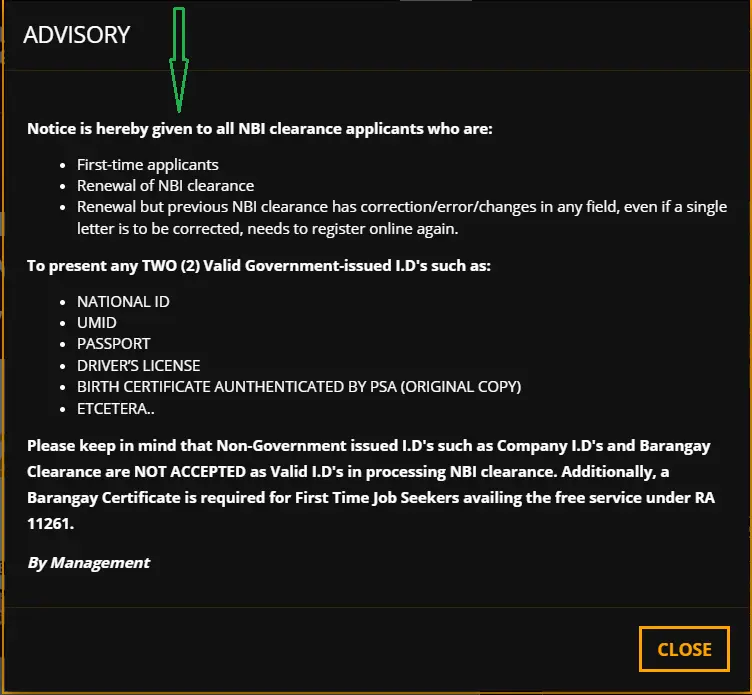
You can also check our detailed article on NBI requirements for more information.
NBI Clearance Online Application Updated Manual 2026
With the advancement in technology in the digital era, the clearance process has been modernized and digitalized for the convenience of the applicants. You don’t need to visit the NBI offices and wait for hours in the queues; you can apply online with convenience. In this guide, we will explain to you with a complete step-by-step procedure.
NBI Registration – Walk-in Application Method
NBI clearance can be applied for online as well as by visiting the NBI office. For old-fashioned persons who are not comfortable with online methods, the walk-in application method can be a good option. Following are the steps that need to be followed for NBI clearance using the walk-in application method.
- Visit the NBI office: Go to the nearest NBI office or branch.
- Fill the NBI Clearance Application Form: Get an application form from the staff and manually fill all the details mentioned on the form.
- Submit Application Fee: Go to the payment counter, submit the fee, and take a payment receipt.
- Photographs & Biometric Verification: After payment, wait for your turn to get your photographs taken and biometric verification by NBI staff.
- Clearance Processing: You will get the NBI clearance after verification. In case of “Hit Status”, you will be required to wait for a few days, and additional verification may be required in some cases.
Disadvantages of the Walk-In Method
- Longer waits with lot of time and efforts required.
- Manual form collection, filling and payments.
- Appointment scheduling is not available.
About Online Registration
NBI online registration is the process of registering an account on the NBI portal. While having online registration of NBI, you provide your personal details mandatory for registration, according to the government act RA 10867, which states that your provided personal details will be saved in a record and can be used for investigation, record verification, and other legal purposes. Once you have your account registered, you can proceed with the application for NBI clearance, renewal, and others.
Key Features of NBI Online Clearance
- NBI Online Registration and Application
- Online Payment
- Online Appointment Scheduling
- Online Easy Renewal
- Online Verification
- Quick & Convenient
- Door-to-door delivery
Applying for NBI registration
To complete an NBI registration, proceed to the official website portal of NBI through your smartphone or a laptop. You need to complete account registration on the portal. After account registration, you can apply for the clearance from the comfort of your home or office. The complete process is explained in this tutorial for your convenience.
First Time Job Seekers NBI Requirements
If you are a first-time job seeker, the requirements for NBI clearance are fewer. You have to provide only a single identity document, like a Barangay certificate or others. Moreover, there is no application fee. However, to apply as 1st time job seeker, you have to apply on the specific link, which is different from the general-purpose clearance web link. Make sure to select 1st time job seekers option.
Note for 1st time Job Seekers:
According to Public Act 11262 signed by the president, “First-time job seekers are exempted from the fee for the clearance applications”.
Multipurpose NBI Clearance Requirements
All the applicants, other than 1st time job seekers, have to apply for the multipurpose clearance. The requirements are already mentioned above. Make sure to select the right option for NBI clearance, which will redirect you to the registration process. The detailed procedure, with the help of screenshots, is explained for your guidance.
How to Register for NBI Clearance Online (Step-by-Step Guide)
Step 1. Proceeding to the Official Link
Proceed to the official website (https://clearance.nbi.gov.ph/) of the NBI for clearance. Make the appropriate selection, for the 1st time job seeker applicant or the regular applicant, you will be directed to the relevant link based on your selection.
After landing on your category type section, the rest of the application process is the same.
When you land on the website, it will prompt you to select the language and agree to the terms and conditions. Select the language and click on “I AGREE” as shown in the image below.

Note: For regular applicants:
- You will be asked if you have previous NBI Clearance from 2014 to present. Select “Yes”, if you have any of the previous clearance since 2014. Otherwise select “No”.
- In case of Yes, you may need to provide previous clearance details
Step 2. Account Registration
After appropriate selection, you will be redirected to the relevant section.
If you have already registered your profile and have login credentials, you can skip registration and proceed directly to step 4. Otherwise, you have to complete the registration process first, as explained below.
- Enter your complete personal details required in the form. Personal details include:
- First Name
- Sur Name
- Date of Birth
- Phone Number
- Email ID
- Old Clearance Number (For applicants already having Clearance previously)
- Click on the checkbox mentioning “Read and accept Terms of Services”.
- Also check the box mentioning “I am not a robot”.
- Then click on “Sign Up”.
For Regular Candidates:
The following image shows the registration section for a regular candidate with/without a previous clearance record.

Note: If you have been previously issued a clearance, click “Yes”; otherwise, select “NO” and proceed further.

Enter your personal details and check for “I’m not a robot”, as shown below:

If you don’t have a previously issued the clearance, you will choose “No”, the following window will open for you, enter details, and click on “sign up”:

For 1st Time Job Seekers:
The image shows the section for first-time job seekers. If you are a 1st time job seeker, you should go through that link:

The rest of the process is the same.
Step 3. One-Time Password – OTP Verification
- After you click on the “Proceed” at the end of step 2, a window will prompt on your screen for entry of OTP (One-time password)
- You will receive an SMS/message on your personal registered phone number, which you provided during the registration process in step 2.

- Enter the received 6-digit OTP in the window and click on submit as shown in the screenshot below.

Note: The validity of the OTP is just five minutes. You could not submit the OTP within five minutes. You can click on the resend OTP and enter the new OTP to submit
Step 4. Profile Information Entry
After the OTP verification, you will be logged into the system to complete your profile by entering other required information in the new window opened as shown in the screenshot. The required information is your personal information, contact details and other information including the following:
- Name (First, Middle & Last Name)
- Phone Number
- Email ID
- Gender
- Birth Place
- Religion
- Nationality
- Marital Status
- Spouse Name & Birth Place
- Address
- Father Name & Birth Place
- Mother Name & Birth Place
- Height
- Weight
- Complexion
- Identification Mark
- Occupation
- Qualification
After entering all the essential/optional details, click on the “Save Information”.Enter the received 6-digit OTP in the window and click on submit as shown in the screenshot below.

Advice: Note down the required details with you before starting the registration procedure to avoid any errors.
Step 5: Apply for clearance after reviewing/editing the Information
- Once you save the information in the previous step. A new window will appear with the summary of all the information entered by you.
- Read the details carefully. You can edit the information if any change is required.
- Then click to “Apply for Clearance” as shown in the below screenshot.

Step 6. Selection of the ID
After you apply for clearance in the previous step, you have to select one of the valid IDs as proof of your identity. The selected ID must be presented to the NBI officials on the day of appointment at the selected NBI branch. You must show the original ID. The list of valid IDs is mentioned at the start of this tutorial.
- Select the valid ID
- Click on “I agree” to proceed to the next step of appointment scheduling

Step 7. Schedule NBI Appointment
If you are applying for the first time, after completing the registration on the NBI and portal and completing the last step, you need to book an online appointment with NBI for the personal appearance at the selected branch or office on the selected date and time slot, along with valid IDs. You will have your biometrics and the photographs at the NBI office or branch.
- Select the nearest or desired NBI office or branch from the list.
- Choose the date for the appointment schedule.
- On the scheduled date, the available time slots will be shown, and you need to choose an appropriate time slot for the appointment.
If you encounter any difficulties, you can refer to the comprehensive tutorial for the NBI Online Appointment.
- The appointment for physical appearance at NBI is only required for the applicants applying for the first time.


Notice!
The appointment for physical appearance at NBI is only required for applicants applying for the first time.
The others have to upload their IDs and the photographs in the prescribed format and proceed with the application submission. They don’t need to schedule an appointment for a Physical appearance at the NBI office.
Step 8. Making the Payment Fee
After completing the previous step, your application is almost complete. However, it will not be entertained unless you have paid the fee. Only the “first-time job seekers” are exempt from the fee payment.
Payment Options
There are multiple options available for the fee payment including cash payment. Some of the available payment options include:
- Payment in the bank over the counter
- Visa/Master card
- Online bank payment transfer
- Payment Apps (GCash, 7-Eleven, Maya, etc.)
If you have difficulties with the online payment method, you can refer to our online payment tutorial with examples of payment through 7-Eleven or GCash.

- Whatever the payment option you use, the reference number will be required to confirm your payment fee. For example, in the image below, the user opted to pay through Bayad Center.


Advice: It is recommended to take proof of payment receipt, reference number, and the print or softcopy of the application along with valid IDs on the appointment day. However, Printing of the application is not mandatory. But the Reference number must be noted down by you.
How to save and print the NBI Clearance online application?
- Login to the NBI portal with your login credentials.
- On left side menu click on the “Transactions”.
- In the transactions, your application will be visible with a reference number. Click for details as shown in below first image.
- Click on Print, this will give option to save in the pdf format
- Select the desired location on your phone or laptop and save it as shown in the second image below.
- You can also directly print it if the printer is attached.


Note: For more information, you can refer to the detailed guide on Saving & Printing the NBI Application.
Step 9. Personal Appearance for Biometrics and Photo for 1st timers
- Visit the selected NBI branch or office on the date and time of your appointment.
- You can visit only on the appointment day, walk-in applications will not be entertained without booking of online appointment.
- In case, you miss the visit on appointment day, you will have additional 15 days to reschedule the appointment again through same procedure.
- Bring the following documents with you:
- Payment Receipt
- 2x Valid IDs issued by the government
- Application Printed copy with reference number (recommended for convenience)
- The NBI staff will check your documents, IDs and application status
- You will have biometric verification at NBI branch
- Staff will capture your photograph
Caution: Be well-dressed and decent while visiting the NBI office. Too casual dresses, like shorts and sleeveless shirts, are prohibited from being worn.
Step 10. NBI Clearance Releasing/Issuance
The processing time depends on your background and criminal record history.
Clearance Processing With NO HIT
“No Hit” means that you have a clean record with no criminal history found against your record. In this case, you will be issued the clearance on the same day of your appointment. After the process completion, you need to wait for your name to be called to receive the clearance. However, in some cases, it can take more time depending on the number of applications in the queue.
Clearance Processing With HIT
“Hit” means that there is a criminal record history. In case of ‘Hit’, there might be a requirement for additional documents and the time for further verification and background checks, which can take several days to verify before the clearance issuance.
NBI Clearance certificate delivery service with an additional fee is also available if you want home delivery. Using this option, you don’t need to personally visit to collect the clearance after renewal or a new application.

The image below shows the specimen of an NBI clearance certificate, which you finally get.

Process Summary
Following info graphics shows you a broader view of the online application process.

Summary of the Online Application Process
The following table summarizes the whole process of the NBI online registration and clearance application process:
| Step | Process | Description | Estimated Time |
|---|---|---|---|
| 1 | Visit the Official NBI Website | Access the official NBI online portal. | 2-3 minutes |
| 2 | Online Registration | If you already don’t have an account, create an online account with personal details | 6-8 minutes |
| 3 | Verification of One Time Password (OTP) | OTP will be received on your phone number /e-mail address, enter the OTP | 1-2 minutes |
| 4 | Log In | Sign in to your NBI account on the portal | 2-3 minutes |
| 5 | Data Form Filling | Enter personal information mentioned in the form. | 5-8 minutes |
| 6 | Appointment Scheduling | Select desired NBI branch along with available date and time to visit | 3-4 minutes |
| 7 | Payment of Fee | Pay the fee online or over the designated counters | 5-7 minutes |
| 8 | NBI Branch Visit | Reach the selected NBI branch on the appointment day and time slot allocated | Varies |
| 9 | Photo Capturing and Biometric verification | NBI staff to take your photo and the finger prints scans | 20-25 minutes |
| 10 | Release of NBI Clearance | No HIT: Get your clearance certificate HIT: Further verification required | 15-20 minutes (1-3 weeks in case of HIT) |
Common Problems in the NBI Clearance Process
Although the NBI clearance process is very easy and smooth, in some cases, the applicants can encounter problems. You can refer to our detailed article on “NBI clearance issues and their solutions“. The following table illustrates the summary of common issues faced by applicants during the application process. Solutions to the clearance issues are also mentioned against each issue.
| Issue | Solution |
|---|---|
| Hit Status | Wait for 5-7 working days. If clearance is not released, contact NBI with additional documents for further verification. |
| Payment Not Reflecting | Wait for 24 hours till payment is reflected. After waiting, report to your payment partner. |
| Payment not Processing | Use correct payment credentials. Contact: Use correct payment credentials. Contact the payment partner (bank or e-wallet) if payment is not processing. Try using a different payment method. |
| Lost Reference Number or payment receipt | Always save the payment receipt or reference number. Request the payment partner to provide the receipt in case of loss. |
| Appointment Slots not Available | Book well before time. Try different branches of NBI. Avoid peak seasons. |
| Wrong or Missing Valid ID | Bring original, valid, and the same IDs as mentioned in the application. Bring additional IDs to avoid verification issues. |
| Missed Appointment | The paid fee is still valid. Reschedule the appointment. |
| Delayed Clearance Release | Wait for 1-2 days. Check portal, if not released, contact NBI support |
| Incorrect Information on Clearance | Cross check all information before application submission. Visit NBI branch for data correction if online information can’t be edited on portal after clearance release. |
| Technical Issues on NBI Website | Clear cache of browser. Use different browser. Try using different device. Check for updates on NBI official channels, if there’s scheduled maintenance of NBI website |
| Printing Issues | Install the latest PDF version. Print from a desktop or laptop instead of a phone. Set at least 300 dpi for the printer. Use A4-size paper. If the existing PDF copy is not opening, re-download the clearance PDF copy from the NBI portal after logging in. |
| Lost NBI Clearance | You can always download and print the clearance by logging in to your NBI portal after the clearance is released. NBI office staff can also provide you copy of the clearance. |
NBI Contact Details
- • Email: [email protected]
- • Trunk Line Number: (632) 8524-8231 to 38 (8:00 AM – 5:00 PM, Monday to Friday)
- • Website: https://clearance.nbi.gov.ph
NBI Clearance Centers
The following are the major NBI offices and the branches for clearance, which can be visited during office hours (8:00 AM – 5:00 PM) from Monday to Friday.
- NBI Clearance Center, UN Avenue, Manila
- NBI Robinsons Galleria Branch
- NBI Quezon City District Office
- NBI Davao Branch
- NBI Iloilo Branch
- NBI Cebu Regional Office
- NBI Cagayan de Oro Branch
Frequently asked questions (FAQs)
Conclusion
After the launch of the official online web portal, the NBI clearance process has become very fast and convenient. You need not visit the office in long queues to apply for clearance. You can easily have online registration, application, appointment, online payment, and verification of your clearance at home using your phone or laptop. You just need to follow the right procedure to avoid any issues during the application process. In this blog article, we have completely described all the steps from start to end. By following the above-mentioned steps, you can easily get your NBI clearance online.