NBI Clearance Issues & Solutions
Applying for NBI clearance online is a simple and smooth process; however, there can be some NBI clearance issues during the online application process. Here we have listed all the common NBI clearance issues that are often faced during the NBI clearance and renewal application online process.

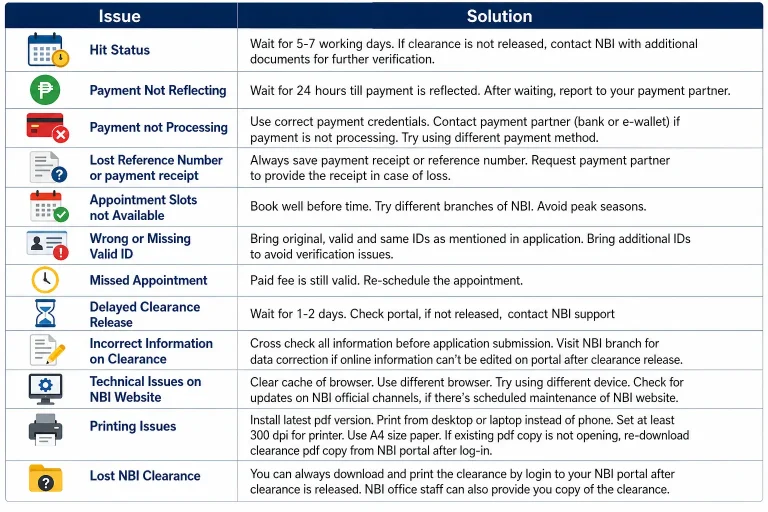
1. “Hit” Status After Biometrics
What is a Hit Status?
Receiving a “Hit” status after the biometrics is one of the common NBI clearance issues. The reason behind this issue is that your name matches one of the criminals in the database of NBI. In this case, an additional wait is added, and sometimes a personal visit to the NBI office is required.
Solution:
- Don’t panic and wait for 5-10 working days till NBI completes the verification process and NBI Hit status is cleared.
- If cleared, no further action is required. If further verification is required, you will be required to visit NBI for additional verification with supporting documents.
Advice: If you need NBI clearance early, apply well before time because in case of a hit, extra verification time will be required.
2. Payment Transaction Issue
Payment Not Reflecting in the System
After making the online payment against the NBI clearance, sometimes the payment doesn’t immediately reflect in the system. This issue sometimes arises due to the banking or payment gateways’ processing delays.
Solution:
- Never pay again, because duplicate payment will be difficult to refund.
- Wait for 24 hours; payment will be reflected in the system.
- Despite waiting 24 hours, the payment is still not reflected in the system. Then contact the payment partner or the concerned bank.
Transaction Failure due to system error
Sometimes the payment transfer is not successful due to the system error or the payment application issue
Solution:
- Recheck to ensure all the details for payment transfer are entered correctly, including card and billing details.
- If there is an issue in fee payment transfer, try using a different method like GCash, Maybank, or a bank transfer.
- Immediately report to your payment partner, bank, or the app if the problem persists.
- If your online payment options are not working, you can personally visit designated cash payment branches for NBI fee payment.
The fee transfer receipt or Reference Number is lost
If your payment receipt or the reference number is lost, this can cause stress to you, but you can find it.
Solution:
- Check your e-mail inbox as well as the spam folder for the payment details.
- You can also get a payment receipt by logging in to the NBI portal.
- Your payment partner can also get you the payment transfer details; just contact your payment partner, like a bank, e-wallet, or app provider.
Tip: Always take a screenshot of the payment receipt for proof.
3. Unavailable Appointment Slots
As NBI appointment slots are limited, sometimes it becomes difficult to get appointments on the desired date and time. Many candidates are always applying for the appointment, resulting in booked slots, particularly in the peak application periods, including holidays and schools’ admission and graduation seasons.
How to Secure a timely Appointment
- Keep on checking the appointments frequently; sometimes the candidates cancel their appointments, which can be claimed by others.
- If your nearby NBI branch is fully booked, try different NBI branches at some other locations, which may have available slots on your desired dates.
- Apply for NBI appointment several weeks before the desired date to get better chances of slot availability.
- Try applying in the off-peak season. March to May and September to November are generally less busy.
- Book early morning appointments.
4. Wrong or Missing Valid IDs
During the online application, you select the 2x valid IDs that are required to be presented on the appointment day. Make sure to bring exactly the same government-issued, valid IDs. Bringing some different IDs, even valid ones, can cause problems in the clearance process on the appointment day.
Recommendations
- Be sure to bring the same IDs as mentioned in the application.
- The IDs must be valid and not expired.
- If you don’t remember which IDs were mentioned in the online application by you, log in to your online NBI portal and re-check the IDs you mentioned to present.
- Bring original IDs; photocopies of the documents are often not accepted.
- Bringing additional valid documents or IDs will be helpful.
Tip: Bring a copy of your online application, mentioning details of IDs and other details, for ease of the process
5. Missing an Appointment
Due to emergency work or illness, there are chances of missing an appointment. However, missing an appointment doesn’t lose your payment. You just need to reschedule the appointment as soon as possible. If you want to schedule the online appointment, you can refer to our detailed article on NBI online appointment process for a hassle-free appointment experience.
What To Do
- Log in to the NBI portal and book a new appointment in an available slot.
- The tour reference number is still valid; use the application reference number to continue for a new appointment.
- Do not initiate a new application; just reschedule an appointment with the same application reference number.
- Reach 30 minutes before the actual appointment time in order to avoid appointment cancellation due to late arrival.
6. Delay in Release of NBI Clearance
This is one of the most common NBI clearance issues. Most of the time, NBI clearance is released on the same day of your appointment for biometric verification. However, in some cases, there can be a delay in the clearance release due to a larger number of clearance applications in the queue or “hit status” on your application during verification.
Solution to the Issue
- Check your application status on your NBI portal; if the status is still processing, wait for 24 to 48 hours.
- Despite waiting for two days, if your clearance of NBI is still not processed, contact NBI support.
- In case the delay is due to “Hit status,” follow the guidelines as mentioned above in the “Hit Status” section.
7. Wrong Information on the NBI Clearance
When getting the NBI clearance, if you notice some error on the clearance, like a typo, a spelling mistake in the name, a wrong date of birth, or some other incorrect information. Then you should get it corrected. This is one of the serious NBI clearance issues.
How to Correct Wrong Information
- Visit the nearest NBI branch with the document or ID with the correct information and request that the staff make the correction.
- The NBI staff will update and correct your data and print it for you.
- In case the error was during your online application at the time of entry by you, you can get it corrected online after an information update.
Tip: Ensure you cross-check all the information and the typing mistakes before submission of the application to avoid unnecessary delays.
8. NBI Website Technical Issues
There can be a temporary issue with the NBI official website at the server end or scheduled updates, causing some features not to work properly. Sometimes, the user end can also cause issues in website loading due to internet or browser problems.
Solution to the lost NBI clearance issues
- Try using a different web browser (Chrome, Edge, Firefox, Internet Explorer, others).
- Switch to a different device to access the NBI web portal.
- Clean your system’s browser cache and reload the page.
- Check for announcements from the official channels of the NBI if there’s scheduled maintenance or an upgrade on the NBI portal.
9. Printing Issues
While printing the NBI clearance, a few applicants experience printing issues like poor printing quality, sizing issues on the paper, bar codes not scanning correctly on paper, or the PDF not opening.
Fixing Printing Issues
- Install the latest PDF version on your laptop or the desktop.
- Try using A4-size paper in good quality.
- Printer’s DPI (dots per inch) should be set at least 300 for better results.
- If the PDF file doesn’t open, try re-downloading the PDF of your NBI clearance and then print it.
- Try using a desktop or laptop to print; printing using mobile phones may cause settings issues for some people.
10. Lost NBI Clearance
If you have a hard copy of the NBI clearance and it is lost, you need not to worry. This is one of the common NBI clearance issues. You can still get a replacement until it expires.
Solution of Lost Clearance
- Generally, a PDF copy of clearance can serve as digital proof of the NBI clearance.
- You can always download NBI clearance from your NBI portal and print it whenever required.
- A replacement NBI clearance can be requested from the NBI branches as well.
Conclusion
The NBI clearance online application and appointment process is very easy, smooth, and convenient. However, sometimes NBI clearance issues can be faced by some applicants. Always keep screenshots or proof of the payment, reference number, valid IDs, and other details. Cross-check the details on the application to avoid wrong information on the clearance. Apply well before the desired time to get appointments and follow our guidelines for a hassle-free NBI clearance experience.