NBI Online Appointment in the Philippines – Complete Guide 2026
An NBI clearance is an essential document for job applications, overseas travel, school enrollments, business permits, and even legal processes in the Philippines. The NBI Online Appointment system has made the process of obtaining an NBI Clearance much easier and less time-consuming.
In this guide we’ll walk you through the whole process to get NBI online appointment for clearance.
Why the NBI Online Appointment System is a Game Changer
The NBI appointment online system modernizes the clearance process. Before the online system was introduced applicants faced problems like overcrowded offices, lost documents, and wasted hours. Using the online appointment system you can book your slot, upload documents, and pay the fees digitally all from anywhere. Moreover, due to custom time slots you can arrive at your scheduled time instead of waiting.
This system is necessary to obtain an NBI clearance. All individuals, including students, professionals, foreign residents, and even senior citizens, must book their NBI appointment online.
How to Book Your NBI Appointment Online: A Step-by-step Guide
Following the given steps will help you book an online NBI clearance appointment:
Step 1: Log in to Your NBI Account
- Proceed to official NBI clearance website and “sign in” using your registered email and password as shown in the top right of the screenshot below. However, If you are a new user you need to sign up first. To know about the sign up and registration process, you can refer to our NBI account registration guide.
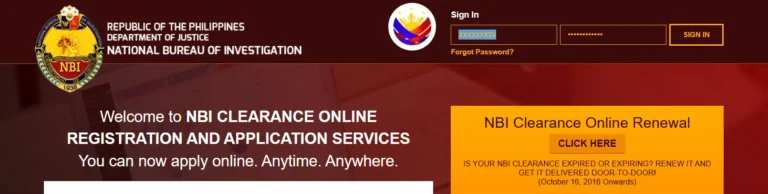
Note: Keep your login details secure to avoid unauthorized access.
Step 2: Apply for Clearance
- Once you are logged in click on “application” which will take you to the application form that you will need to fill out.
- Provide complete accurate personal information, including yourFull name (matching your information. Your permanent and current addresses and the purpose of your application (such as employment, travel, adoption) and click on “Save Information”.
- Then click on “Apply for Clearance”.
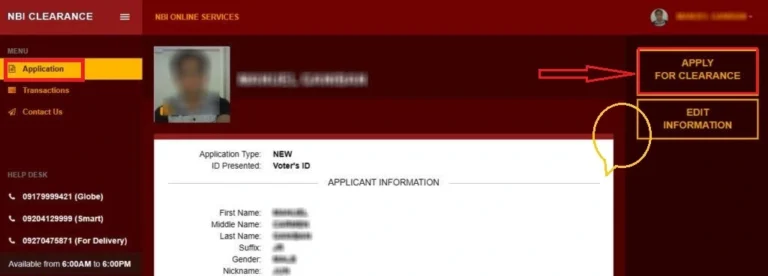
Advice: Don’t forget to double check all the information you’ve entered. Mistakes can create mismatched records and delays. You can also edit the information in the “Edit information” section.
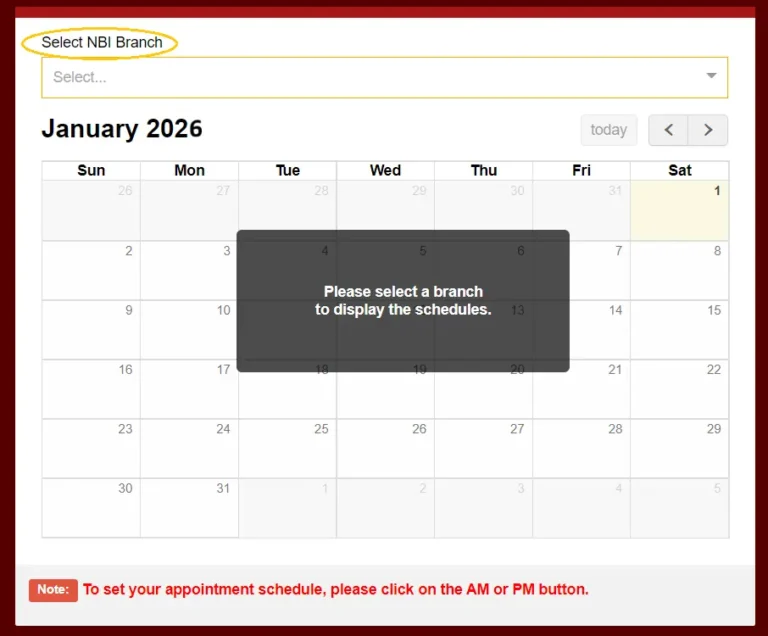
Step 3: Select the NBI Branch to visit for an Appointment
- Once you’ve filled out the form you’ll be given the options for your appointment.(Such as time, branch and date)
- To make things easier for yourself, choose a branch that is close to your home or workplace. Just to let you know, slots in popular branches are filled very quickly.
- If you book your appointment in a rural branch, you might get to choose same-day slots.
Step 4: Schedule NBI Appointment Date & Time
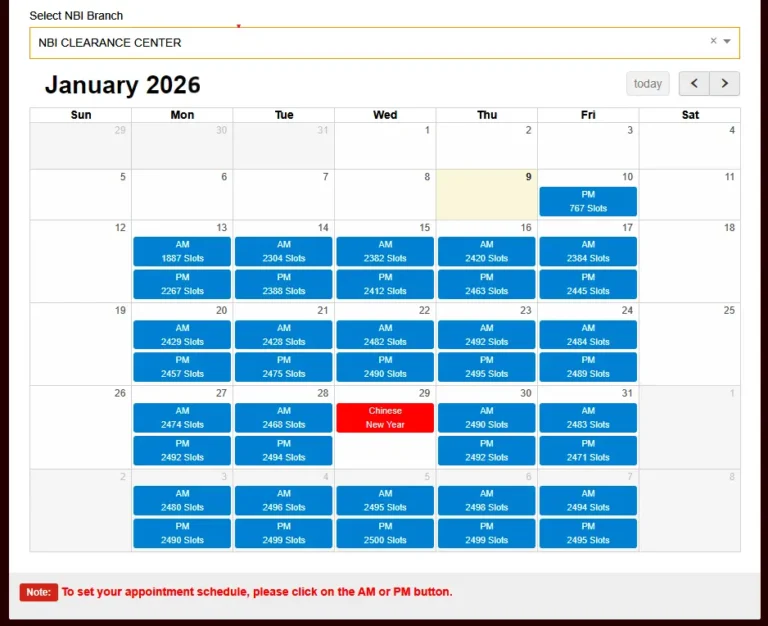
- Schedule your NBI clearance appointment by picking a date and time. Mornings (8:00 AM–10:00 AM) are usually less crowded. You should try to avoid Fridays and holidays, as these days are the busiest.
Step 5: Application Fee Payment
- Once the NBI clearance appointment is scheduled, you will have to choose a payment method for the fee. The standard fee is PHP 155, with PHP 130 as the base fee and PHP 25 as the system fee; some payment platforms may charge an additional fee. Payment options include:
- GCash or PayMaya (instant confirmation).
- Over the Counter: Via partner banks like BDO or Landbank (allow 24 hours for processing).
- Select the desired payment option and proceed to pay. Your reference number will be created by the system for payment and application reference.

- Tips:
- Don’t forget to save the receipt of your payment. You’ll need it for verification.
- You can follow our guide on NBI Fee Payment through G-Cash & 7-Eleven.
What to Bring on Your NBI Appointment Day: Don’t Forget These!
As you will be going to an NBI office for your appointment, you’ll need to have following documents ready for verification.
- Online appointment Confirmation printed out because that will be your entry pass into the NBI office.
- A Valid Government ID that can be your Passport, Driver’s License , SSS ID or UMID and Voter’s ID
- Payment receipt in printed or digital form.
- Supporting documents depending on the purpose of your application.
- If you are getting your clearance to travel abroad you’ll need to have your proof of flight tickets, visa or employment contracts.
- If you are a foreigner you’ll need to have ACR ICard or Alien Certificate of Registration.
- In the case of adoption matters you need to provide court orders or adoption decrees.
Summary of NBI Clearance Requirements w.r.t Applicant Type
| Applicant Category | Documents Required | Further Requirements |
|---|---|---|
| First-time applicants | – Valid ID issued by the Philippines government (Driving license, Passport, Voter ID, or any other government issued) | – Confirmed NBI online appointment – Fee payment receipt |
| NBI Clearance Renewal | – Previous NBI clearance – Any other Valid government issued ID | – Confirmed NBI Clearance appointment – Fee payment receipt |
| Job/Employment | – Valid ID issued by the Philippines government | – Job offer letter /Employment contract from the employer |
| Foreigners | – Passport – ACR Card | – Additional documents may be required from foreign nationals depending on the application purpose like immigration, travel or employment |
| Travel Abroad/Immigration | – Passport | – Visa/Tickets may be required additionally |
| Child Adoption | – Valid government ID | – Documents related to the court’s approval for adoption may be required additionally |
Common issues faced by users and their solutions
1. Downtime and slowing down of the online web portal
Solution:
- Make sure to have good internet connection.
- In case of slow response from the website, try using in the peak off hours.
- If the website still crashes, clear your web browser cache.
2. Fee Payment is not reflecting
Solution:
- Wait for 24 hours. Sometimes, the payment gateways take time and payment gets reflected within 24v hours.
- If the problem persists after 24 hours, send an email to NBI support ([email protected]) along with the application reference number and payment proof.
3. Name Discrepancy or “Hit”
Solution:
- If the website gives you the “Hit” message and you don’t have any criminal record, you must visit the NBI office with supporting documents (e.g., birth certificate, marriage certificate) to resolve mismatches.
4. Missed Appointment
Solution:
- If you missed your appointment, it’s ideal that you re-schedule your appointment immediately via the website.
- Caution! If you miss two slots, your account might be blocked temporarily.
5. Branch Fully Booked
Solution:
- If the branch you are interested in visiting is already booked on your desired dates, you should try to check for the other branches for appointment availability.
Some tips for a Hassle-Free Online Appointment
- It’s ideal that you book 2–3 Weeks earlier than when you need your clearance. Slots vanish quickly during peak seasons (For example summer, holidays).
- You should prepare a document checklist so you don’t forget anything. You can also use our table to help you out with this.
- You should try to arrive about 30 minutes before your scheduled time because of traffic and long security lines.
- You should dress comfortably and avoid sleeveless tops or shorts to adhere to a decent dress code.
FAQs: Frequently Asked Questions
Conclusion
The launch of the NBI online appointment system has made the clearance processes very easy by minimizing the time and efforts involved in manual applications and longer queues during the NBI branch visits. Although the online system is convenient, however, this might be tricky for applicants who are not very familiar with tech and IT. By following our step-by-step simple guide, you can easily go through the whole application process by avoiding any mistakes and get your online appointment at any of the NBI branches to complete the clearance process.
If you’re getting into a new job, planning an overseas trip, or handling your legal matters, your online appointment is the first step toward it. Don’t forget to share this guide with others to help them breeze through their applications as well.