
How to Pay NBI Clearance Using gCash in 2026
Digital payment platforms have increased the ease of payments manifold. You need not visit the banks or the relevant offices to make the payments and the fees. You can do the fee payments online through the digital payment options. One of the very famous and common digital payment gateways is GCash in the Philippines. Many Filipinos are well aware of this payment app.
You can also pay the NBI fee using GCash digital payment wallet. You must be curious about “How to pay NBI clearance using GCash? ”If you are not familiar with the online payment through GCash, you need not worry about it. In this tutorial, we will guide you through the complete process, beginning from GCash account registration to online fee payment. You just need to have a laptop or a smartphone and a good internet connection.
GCash Account Setup
In order to make the online NBI clearance fee through GCash, you need to have a GCash account. If you don’t have a GCash account, you should follow the steps below to register it.
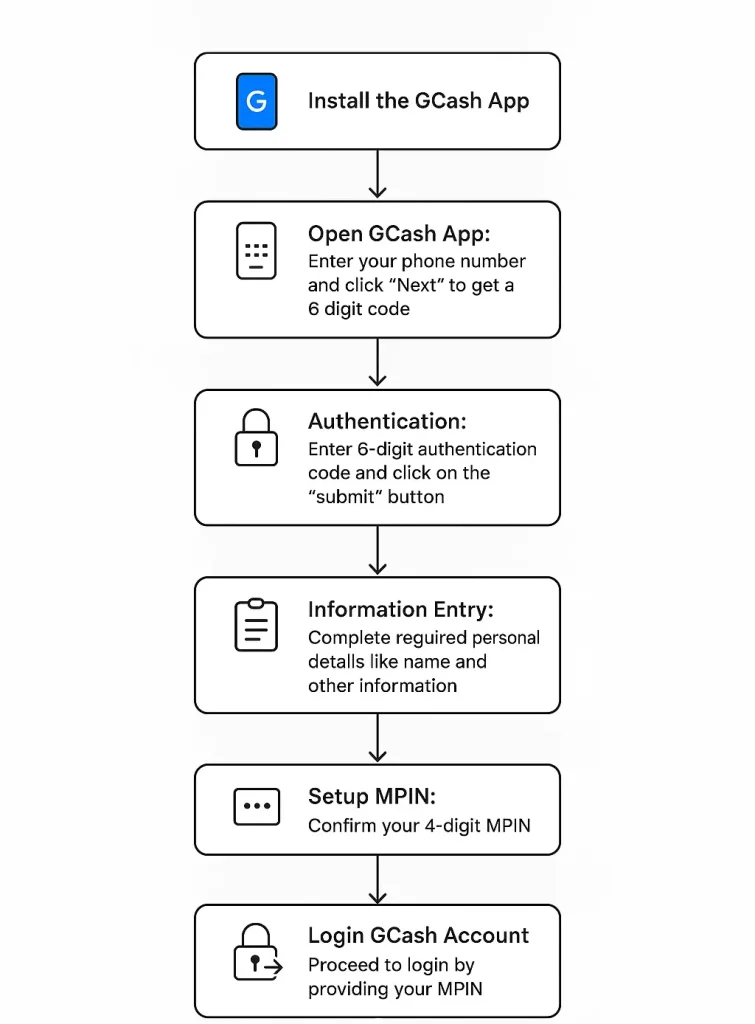
- Install the GCash App: Go to the Play Store (Android users) or the App Store (iOS users), search for GCash, and install it.
- Open GCash App: After installation is complete, launch the GCash app, enter your registered mobile phone number, and click “Next”. You will get a 6-digit code on your provided phone number.
- In case you don’t get the code, tap on “Resend Now” to get the code.
- Authentication: For identity verification, you will need to enter the 6-digit authentication code received on your phone and then click on the “submit” button.
- Information Entry: Complete the registration by providing your required personal details, such as name and other information.
- Set up MPIN: Confirm your 4-digit MPIN.
- Avoid pin which can be guessed easily, like your birth year, 1234, or the last digits of your mobile phone number.
- Log in to GCash Account: Proceed to login by providing your MPIN.
- For the 1st time, you also need to enter your authentication code received on your mobile phone for device authentication.
- Authentication might be required every three months.
- Top up your wallet: Add the desired amount to your wallet through a debit card, online bank transfer, someone else’s GCash, or through dedicated franchises.
Note: Seven Eleven is the official partner of GCash for cash-in/OUT for GCash. You can withdraw and submit cash through your GCash from Seven Eleven franchises using Click Quosk machines.
GCash Account Registration Process Flow Chart
The following infographic illustrates the summarized flow chart of the GCash account registration process:
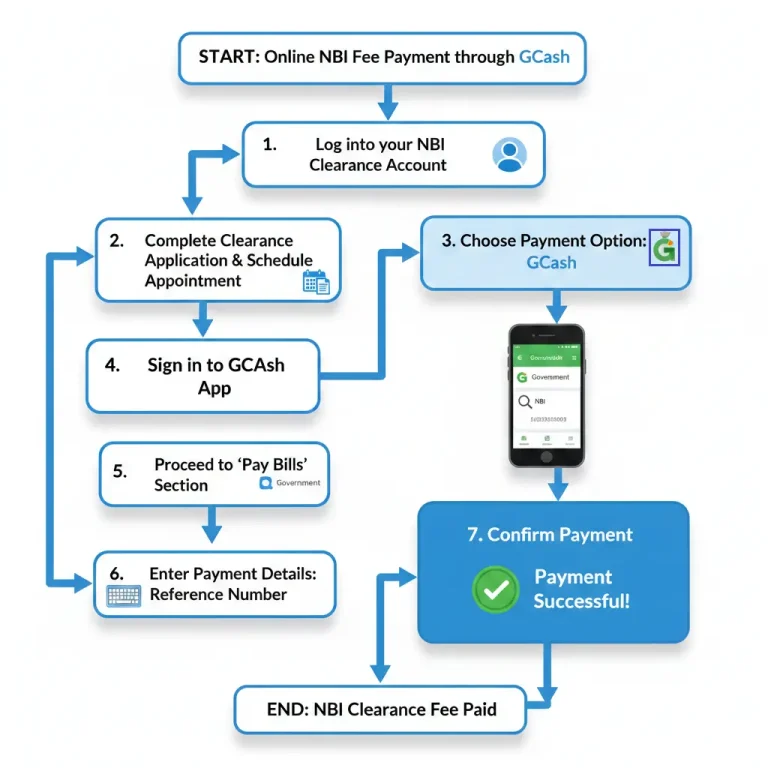
How to pay NBI clearance using GCash step by step
After your GCash account is set up and has enough balance in this wallet, you are good to go for NBI clearance or appointment fee through GCash. Follow the following steps to “how to pay NBI clearance using gcash”.
- Log in to your NBI Clearance Account: Proceed to the NBI Clearance official web portal and log in with your registered account.
- Complete the Clearance Application Form: Enter the required details by completely filling out the form for clearance application or renewal. For a new clearance application, schedule the appointment on the desired date and NBI branch.
- Choose Payment Option: For the payment, choose GCash among the available payment options. Also, note down your application reference number, which will be required for payment identification.
- Sign in to your GCash App: Open your GCash registered app on your phone.
- Proceed to ‘Pay Bills’ Sections: In this section, go to the Government section to find and select NBI.
- Enter Payment Details: Enter your application and payment reference number generated during the NBI application, and proceed. The system will automatically fetch the details from your entered reference number.
- Confirm the Payment: Verify the payment details, including your name, amount, and other details. After reviewing the details, confirm the payment. You will also receive the payment confirmation acknowledgment via SMS and email. Save the confirmation message as proof of fee payment.
Process Summary of NBI Online Fee Payment via GCash
Frequently asked questions (FAQs)
Conclusion
Digitization of the NBI clearance system has made the whole process faster, more convenient, and transparent. The online fee payment for NBI clearance and renewal is very quick and hassle-free. You don’t need to visit the banks or wait in line for fee payment. The NBI system offers multiple online payment options, including bank transfer, credit cards, debit cards, 7-Eleven, and digital wallets like Maya and GCash.
Digital wallets like GCash are the easiest to setup the account. Unlike bank accounts, you don’t need any documentation or physical appearance for account registration. This is the most convenient option for those who don’t even have a bank account. By following the step-by-step guide, anyone can set up a GCash account within minutes and enjoy a hassle-free online payment transfer experience, including fee payments for NBI clearance and renewal. If you find our tutorial helpful, please share it with others. Everyone has the right to access good information and enjoy an online NBI clearance and fee payment experience.